A business headshot introduces the person clients and colleagues will meet. Create yours from your own photos, with studio-quality lighting, clothing, and background. Preferences are optional; no studio appointment needed.
In the full paid workflow, we check results against your original photos and select one recommended headshot plus two alternatives per scene.
Mention how you meet clients or a photo requirement if useful. We can arrange the complete look for you.
Use Professional-Headshot.ai for free · No account required
Examples show actual AI-generated product results from licensed reference photos. Business situations are illustrative, not customer stories or the subjects’ biographies.
What could your business headshot look like?
A business headshot can feel composed in a jacket, approachable in a collared knit, or lively in a simple blouse. These product examples show how the whole photograph works together. They are references for understanding the result, not styles you must select before starting.
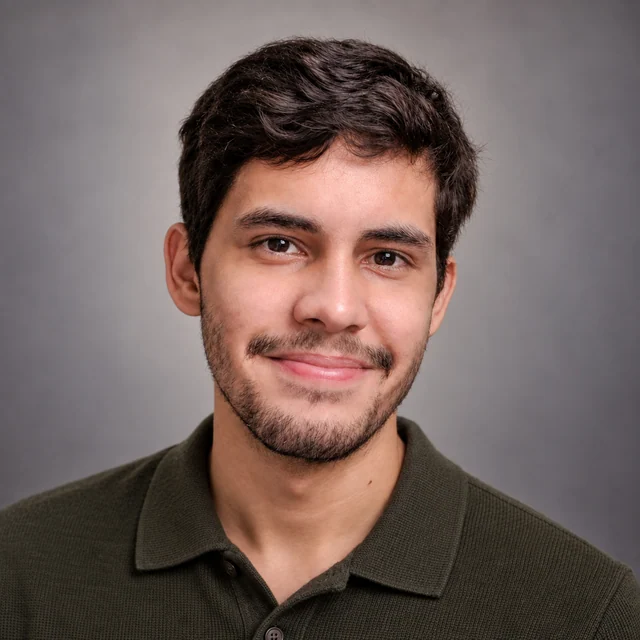
Collared knit, clear face, quiet setting
The olive collar gives the neckline structure without a tailored jacket. A small smile and softly lit eyes keep the face central, while the gray background adds no workplace story. This is a useful starting direction if you usually meet clients in neat, practical clothes and want that familiarity to remain in your business headshot.
Reference: Wellington Ferreira / Unsplash.
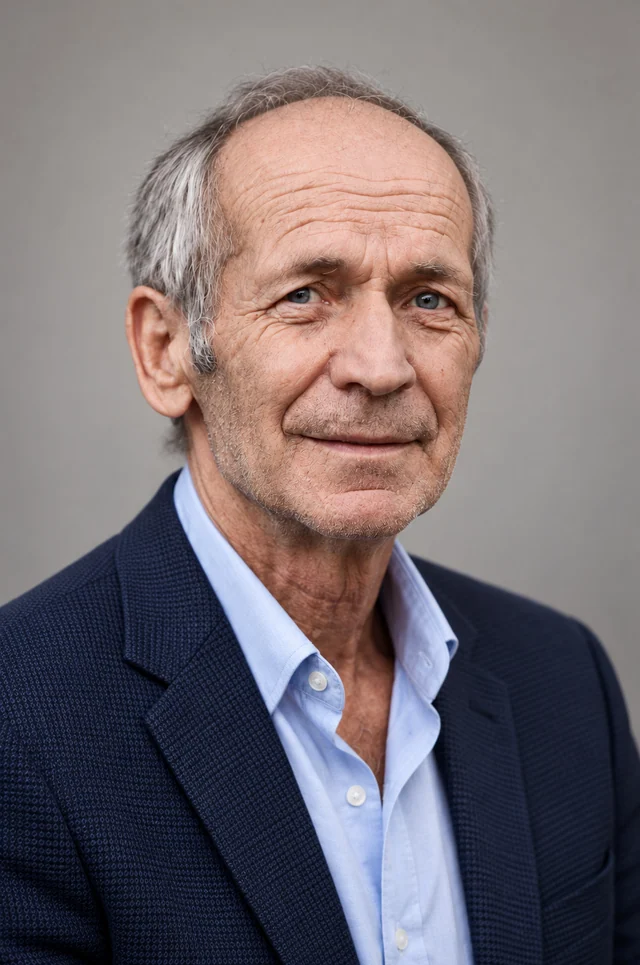
A tailored layer without a rigid expression
The navy blazer creates a more structured outline, but the open collar and slight smile keep the portrait relaxed. Gray hair and facial lines remain visible in the light. Your business headshot can have a polished finish without making a younger face or a stern expression part of the brief.
Reference: Mihai Lazăr / Unsplash.
A simple blouse with a brighter setting
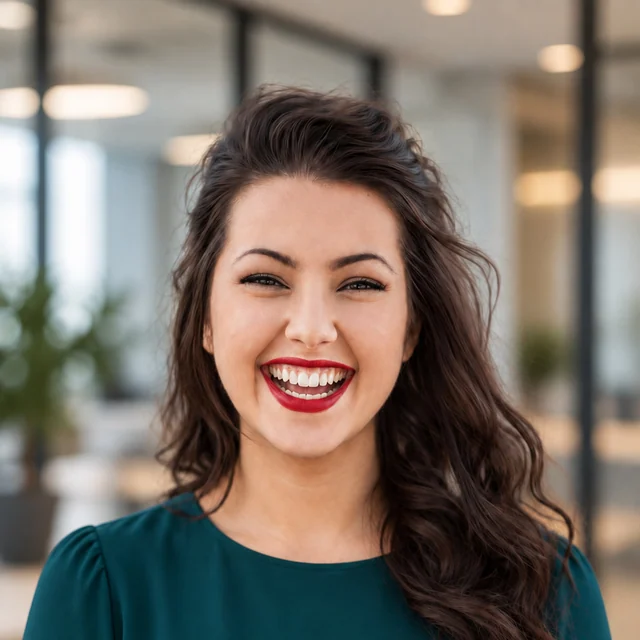
The teal blouse, broad smile, and softly blurred office-style surroundings make a more animated introduction. Clear facial light keeps the person prominent in this generated setting. This business headshot direction can suit someone who prefers a brighter environment and a more expressive portrait to a plain-backdrop look.
Reference: Michael Dam / Unsplash.
Open a portrait to view the full image.
When your work happens at the client’s location
A business headshot does not need an office behind it
Imagine you run an on-site service business. Clients meet you at their premises, and your website needs a photograph beside the introduction to its owner. You have current phone photos, but no office to photograph and no reason to dress as though you work in one. A business headshot with clear portrait light and familiar clothing can introduce you without changing that story.
Olive collared knit, a small smile, and a quiet gray backdrop. Reference: Wellington Ferreira / Unsplash.
What the simple portrait gives you
In this example, the collar, textured knit, and even facial light give the photograph a finished look. The quiet background lets it sit beside a business description. For this owner’s introduction, the familiar face and everyday level of dress present the person a client will meet, while the surrounding text explains the service.
Describe the clothes clients normally see
If you meet people in a plain polo or collared shirt, that can guide your business headshot. Ask for a neat version of that clothing with soft portrait light, rather than automatically adding a suit. If an initial result feels too formal, name the change: a collared knit instead of a blazer. You can ask to retain the expression and quiet backdrop rather than starting a completely different look.
Let the headshot and the work photographs do different jobs
A portrait introduces who will answer the call or arrive for the appointment. Keep that face clear with a quiet backdrop and balanced light; use separate real photographs to show completed work, equipment, or premises. Opening an office can call for new location imagery without changing a business headshot that still reflects your appearance and preferred styling.
Optional request for your own photos
Create a business headshot for my on-site service business. I meet clients in a plain collared shirt. Use a quiet neutral backdrop and soft facial light, with a natural expression and my current facial details.
Suggested edit for an existing result with eligible paid editing access: “Replace the blazer with a plain collared knit. Keep the soft light and neutral background as the direction.”
When you work with more than one business
A business headshot for your consultancy and your client’s project
Suppose you are an independent consultant working with an established manufacturer and a young software company. Each has a different visual style. You need a business headshot for your own consultancy, and one client also wants a photo for a project introduction. The first portrait represents your business across relationships; the second may need to meet a particular presentation brief.
Navy blazer, open collar, gentle expression, and visible facial detail. Reference: Mihai Lazăr / Unsplash.
A starting look for your own business
The navy jacket and pale shirt create a considered business look. The gray backdrop and soft light keep attention on the person. If this level of dress reflects your own client meetings, it could be a useful direction for your business headshot across several introductions. For your own result, keep the hair, age, and facial details that make you recognizable.
For your own consultancy
Keep your own presentation as the reference
For your own consultancy, base the clothing, expression, and studio setting on how you introduce yourself in client meetings. In this example, an open collar and gentle expression soften the navy jacket. If you normally meet clients in a shirt, request that direction for your business headshot. A client’s palette is useful context when you are making a portrait for that client’s page.
Optional request
A business headshot for my independent consultancy: a navy jacket, open-collar shirt, quiet gray background, and soft portrait light. Keep my current hair, glasses if present, age, and natural expression.
For a client’s project introduction
Apply the requirements to that particular version
Suppose the client explicitly asks for a white backdrop and a jacket for everyone shown on a project page. Add those requirements to your business headshot request. If you already have a result you like, active paid editing access lets you request the white backdrop while using its jacket, expression, and soft light as the direction.
Optional request
For this project introduction, change the background to plain white. Retain the navy jacket, open collar, and gentle expression as the direction. Keep the lighting soft and my natural facial details recognizable.
Use your own business presentation as the starting point; add client-specific clothing or background instructions when supplied. A suitable existing portrait can answer an open request. If a separate version is needed, keep track of which introduction it serves and compare earlier versions within the storage period.
The pictured result has a gray backdrop. The white-background request is an example; that edit is not shown.
Why choose us for your business headshot?
Create a studio-quality business headshot without sorting through a large gallery. In the full paid workflow, we check the options against your original photos and select one recommended portrait plus two alternatives for each scene, so you can start with a clear recommendation for your business introduction.
One Recommended Headshot. Two Alternatives.
For each paid scene, the system organizes the strongest results into one recommended headshot and two alternatives. Start with the recommendation for your business profile, and view the alternatives if you want another option. The checking and selection are handled for you; comparing every generated image is not your task.
CreateCheckSelect
Quality Checks Before Delivery
Clear business portrait lighting should not be undermined by distorted glasses, unnatural eyes or teeth, or changed facial features. We check for these visible issues, repair or replace affected photos where possible, and leave out results that still fail the checks.
Keep the Details That Make You Recognizable
Your glasses, facial hair, hairstyle, age, skin tone, and natural facial details should remain part of the business headshot. A new jacket or cleaner background can change the presentation while the portrait still introduces the person clients will recognize.
Your Studio-Quality Look, Handled for You
We arrange clothing, background, lighting, and overall styling together for each business portrait scene. Begin with your photos alone, or mention a preference such as a collared shirt and a simple backdrop. You do not need to configure an outfit or design the studio setup first.
Refine the Result Instead of Starting Over
With eligible paid editing access, select a result and describe a change, such as a lighter background for a client introduction. Your original photos continue to guide the edit, and earlier versions stay available for comparison during the storage period. You can refine the existing portrait without starting from a new upload.
Bring the business context, not a complete photography brief
Your business headshot starts with a clear, recent view of you. Everyday clothing in the reference is fine: the system can arrange the finished outfit, background, and lighting. If your only photo is heavily filtered or hides your eyes, use a clearer reference rather than expecting studio styling to recover the missing detail.
Professional-Headshot.ai brings those choices into the same photo-to-portrait workflow. You can upload without writing a request. If helpful, add one sentence about who you meet or a concrete requirement for the finished image.
A useful starting sentence
“I meet clients in a collared shirt and want a simple studio backdrop” gives the system a practical direction for your business headshot. You do not need lighting terminology or a list of scene settings. If you already have a photo requirement, include it alongside your own preferences so the intended use is clear.
Continue from the recommended result
In the full paid workflow, start with the recommended portrait for the scene. Open the two alternatives only if useful. For a remaining preference, select a result and describe the change with eligible editing access. Download according to your access, then add the photograph to your website or send it to the recipient through their usual process.
It is a portrait focused on your face, usually including the shoulders, used to introduce you in a business context. Clothing, expression, and clear portrait light support that introduction. It can represent an employee, an independent professional, or a business owner; a suit and an office background are not part of the definition.
Do I need a suit for my business headshot?
No. A collared knit, blouse, or shirt can work when it fits the way you meet clients. Portrait lighting and a considered background help give those clothes a finished presentation. If the recipient specifies a jacket, include that instruction; otherwise, a more formal outfit is a preference rather than a universal requirement.
Can I create one if I work from home or at clients’ premises?
Yes. You provide photographs that show you clearly; the finished business headshot can use a simple studio backdrop or another suitable setting. You do not need to photograph a home office first. If people need to recognize an actual place they will visit, show a real location photo separately from your portrait.
Can the same portrait serve different clients?
Yes, when the clothing, background, and expression fit the intended introductions and the recipients accept generated portraits. A client’s different brand colors do not automatically require a new business headshot. A specific photo brief may justify a separate version while your existing portrait continues to represent your own business.
Should my logo or uniform appear in the picture?
You can describe a clothing direction, but exact logos, embroidery, and uniform details are not guaranteed. For a general business headshot, a simple outfit and clear facial lighting can work alongside branding added in the surrounding page layout. If the photograph must document a particular physical uniform or badge, use a photograph of that item being worn.
Can I start with a selfie in everyday clothes?
Yes. Choose a recent photo with a clear face, visible eyes, and no heavy filter. Your source outfit does not need to match the finished business headshot because clothing and studio styling are handled in the generation. Add another useful reference if hair, shadows, or glasses hide details in the first photo.
Will the portrait keep my gray hair, glasses, and natural features?
Your original photos guide your recognizable appearance, including age, hair, glasses, facial hair, and skin tone. Clear portrait light should help show those features. Preservation is a goal, not a guarantee of a perfect match; compare the finished result with your current appearance before using it for a business introduction.
Can I use Professional-Headshot.ai for free?
Yes. Get started for free using the photo form on this page; no account is required to begin. The complete multi-scene workflow, recommended delivery sets, and ongoing edits belong to the applicable paid plan. The plan details explain the current access for creating and refining your business portrait.
Do I have to choose from a large batch of photos?
No. In the full paid workflow, the system checks and selects one recommended portrait plus two alternatives for each scene. You can start with that recommendation and look at the alternatives if helpful. Final confirmation that the styling fits your business use is different from having to sort through all the generated options.
Can I change the background or clothing afterward?
With active paid editing access, select an existing result and describe the change. Original references continue to guide the edit, and earlier versions can be compared during the storage period. Direct edits do not rerun the full initial generation and checking pipeline, so review the revised clothing, background, and facial detail before using it.
Can I send an AI business headshot when someone requests a photograph?
Check whether the recipient accepts generated portraits and whether the finished styling meets the brief. If they require a newly photographed image, an exact physical outfit, or a documented location, arrange the corresponding photography. This tool creates AI portraits with a studio-quality presentation; it does not certify that a camera session took place.
Create a business headshot for the person clients will meet
Start with your own photos. We handle the portrait lighting, clothing, and background; you can add the business context that matters to your introduction.