A professional profile picture helps work contacts recognize the person they are reading about or speaking with. Create your professional profile picture with studio-quality facial light, a familiar expression, and clothing that suits your working life. Upload your own photo to get started for free; styling preferences are optional.
In the full paid workflow, we check results against your original photos and select one recommended professional profile picture plus two alternatives per scene. We handle the complete look and the initial selection.
Your photos are enough to start. Add a clothing preference or a profile photo brief if you have one.
Use Professional-Headshot.ai for free · No account required
Actual AI-generated product examples from licensed reference photographs. Results vary; the examples do not represent the number of images included in free use.
A portrait for your working life
A professional profile picture introduces the person behind the work
Suppose you offer a service under your own name and are preparing to contact new clients. You have an everyday photo with a smile you like and want a professional profile picture with a more considered finish. Start with that person and expression. Clear facial light and suitable clothing shape the professional profile picture; your profile explains the service and shows your work. Follow this example from the reference photo to a client conversation.
Original reference photograph
Keep the person your contacts will meet
The original shows a broad smile, swept-up hair, a beard, and clearly visible eyes. Those details give a professional profile picture a personal starting point even though the white T-shirt is casual. Use your own familiar expression as the reference. Your professional profile picture can have more considered clothing and lighting without requiring a more serious expression or a different-looking face.
AI-generated professional profile picture · product result
A considered introduction to a new contact
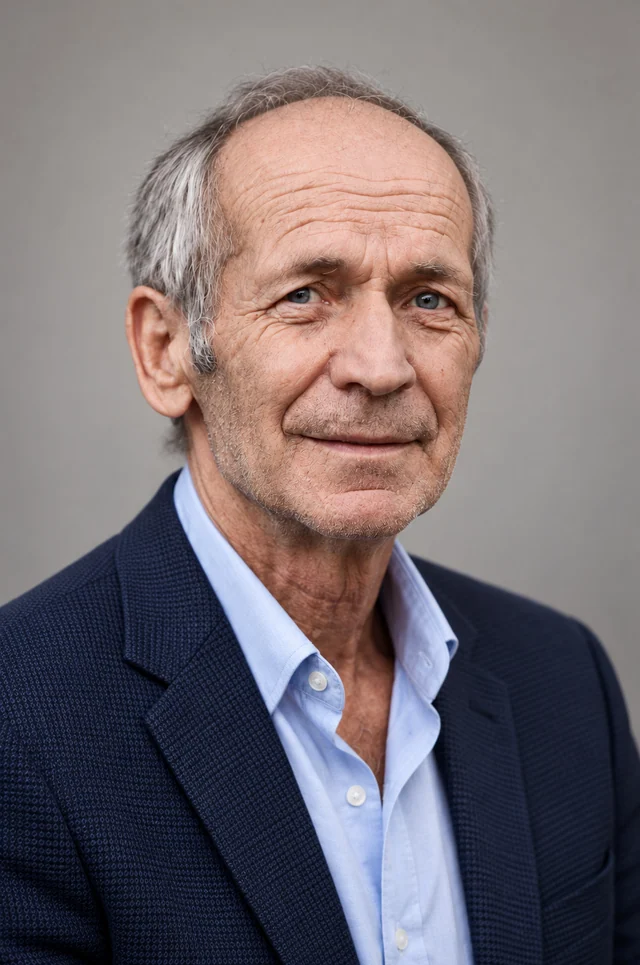
The navy blazer and open pale-blue collar give this professional profile picture a businesslike but approachable presentation. The eyes, smile, and beard remain prominent under clear facial light. These are visible qualities a client can see. The blurred office adds a working atmosphere; it cannot tell them which service the person offers. For your professional profile picture, borrow the level of dress if it fits how you meet clients, and let your own photos supply the person.
Reference photograph: Joseph Gonzalez / Unsplash. The portrait is an actual Professional-Headshot.ai result. The client-contact situation is illustrative, not this person's occupation, account, or endorsement.
What can a professional profile picture communicate?
A professional profile picture shows your face, expression, and way of presenting yourself. A familiar smile and clear light introduce the person behind the profile. Your role, experience, and offer need words and genuine work examples beside that image. A more impressive office or formal jacket can change a professional profile picture, but it will not explain what a client can hire you to do.
A useful brief for your professional profile picture is the way you normally introduce yourself to clients, with coordinated clothing, light, and background. You can leave those styling choices to us. The next example shows how the finished portrait and the information beside it work together.
Your professional profile picture in a client conversation
A clear face beside a clear offer
Imagine the service is writing website copy. 'Independent professional' leaves a prospective client guessing, even beside a well-lit professional profile picture. In this illustration, the service line becomes specific while the image stays the same. The follow-up message refers to the actual project. A professional profile picture supplies a familiar face through the exchange; the words explain what the conversation is about.
Profile · explain the service beside the portrait
Selected writing projects
Your name
Website copywriter
I write homepages and service pages for small businesses.
'Website copywriter' and the service sentence tell a visitor what they could ask about. The professional profile picture introduces the person with a clear face and open smile. Adding a laptop or writing desk to a professional profile picture supplies scenery, but would not explain the service as precisely. Actual work samples support the written introduction; the generated office is styling, not evidence of professional experience.
Conversation · connect the reply to the project
Your name
Thanks for asking about your homepage rewrite. Could you share the current page and what you want to change?
The reply names the homepage project; the professional profile picture carries the personal introduction. The same smile, hair, and clearly lit face remain familiar through the exchange. If the recipient is unsure which project you mean, clarify the message. A different backdrop would not answer that question. Keep a professional profile picture that represents you while making the conversation more specific.
Fictional service, profile, and conversation using an actual product portrait. They do not describe the pictured person's occupation, a real client exchange, or profile designs created by the generator.
An unclear offer does not need a new professional profile picture
Replacing 'Independent professional' with a concrete service gives the visitor information a professional profile picture cannot provide. Keep the studio lighting and familiar face if the presentation suits you; a more senior or successful-looking image would not clarify the offer. Put your actual service and relevant work in the profile fields. Change your professional profile picture when something visible about the presentation needs attention. The profile text here is illustrative, not a biography-writing feature of the headshot generator.
When the picture is the part to change
Match your professional profile picture to how you meet clients
Keep the same website-writing service in mind, but suppose the jacket in your professional profile picture feels unlike the simple sweater you normally wear with clients. The service description is accurate; changing it would not fix the clothing mismatch. Describe your usual clothing so the professional profile picture feels familiar as well as polished. This separate product result illustrates that direction.
Another actual result from the same reference
Separate generated result, not a demonstrated edit of the navy-jacket portrait. Reference photograph: Joseph Gonzalez / Unsplash.
The service stays the same; the presentation changes
The green sweater and white collar give this professional profile picture less structured clothing than the navy blazer, with soft facial light against gray. The broad smile, hair, and beard still lead the introduction. The same service sentence could sit beside either professional profile picture. The change addresses a personal clothing preference; neither outfit proves writing skill or makes the service more valuable. Your preference can include keeping a jacket you normally wear.
An optional request for that visible mismatch
For my professional profile picture, use a simple sweater over a collared shirt, as I usually wear for client calls. Keep a warm, familiar expression and soft facial light, with a quiet background. Use my original photos to guide my appearance.
Include this preference when creating your professional profile picture, or describe it on the recommendation with eligible paid editing access. The sweater image is a separate generation, not a demonstrated edit of the jacket image or an exact-garment promise. When your professional profile picture already fits how you introduce yourself, use it. No clothing comparison or additional edit is required.
Create your own introduction
Turn the example into your professional profile picture
Start your professional profile picture with a recent photo that makes you easy to recognize. If useful, describe how you meet contacts: relaxed client calls, formal introductions, or a mix. That context guides the clothing, light, and setting. A professional profile picture does not require one occupation-specific outfit, a finished studio photograph, or a rewritten biography before you begin.
Use the appearance you want people to recognize now
Your professional profile picture should begin with clear references showing your current hair, usual glasses, and familiar expression. An everyday photo can supply those details. Borrow a styling idea by describing the sweater, open collar, or background in words; use your own face as the reference. For a professional profile picture update, current photos are more useful than an older, formally dressed image that no longer looks like you.
Professional-Headshot.ai brings the studio styling, checked recommendations, and eligible result edits together in the workspace above. Your professional profile picture can begin with a photo you already have, while your own appearance and working style give the finished portrait its direction.
An optional professional profile picture request
Create a professional profile picture for introducing myself to new clients. I usually meet them in an open-collar shirt. Use my current appearance and usual smile, with clear studio lighting and a quiet background. Please coordinate the complete look around that introduction.
Keep only the professional profile picture preferences that matter to you, or leave the field empty. Include a specific clothing or background requirement if you have one. Your service description belongs in your profile; this request directs your professional profile picture. We can coordinate the complete studio look without asking you to choose a preset pack or lighting setup.
In the full paid workflow, begin with the recommended professional profile picture beside your actual introduction. If the appearance fits but the work is unclear, improve the profile description. If the clothes or setting misrepresent how you introduce yourself, describe that visible change in an eligible paid edit. Your original photos continue to guide your professional profile picture. This is a final fit check, not a task to sort through a batch of candidates.
Why choose us for your professional profile picture?
Create a studio-quality professional profile picture without taking on a gallery to sort through. In the full paid workflow, we check options against your original photos and select one recommended professional profile picture plus two alternatives per scene. Your references guide the person behind the work profile; we handle the styling and initial selection.
One Recommended Headshot. Two Alternatives.
For each paid scene, the system organizes the strongest results into one recommended professional profile picture and two alternatives. Begin with the recommendation for your work introduction. View the alternatives if you want another option; comparing a batch is not required before using your professional profile picture.
CreateCheckSelect
Quality Checks Before Delivery
Clear light in a professional profile picture should reveal your features. We check for distorted glasses, unnatural eyes or teeth, and changes to facial features. Before recommending a professional profile picture, we repair or replace affected photos where possible and leave out results that still fail.
Keep the Details That Make You Recognizable
Your professional profile picture should feel familiar when a work contact meets you. Glasses, facial hair, hairstyle, age, skin tone, and natural facial details should remain part of the result. A more polished professional profile picture uses lighting and presentation to support the person people recognize.
Your Studio-Quality Look, Handled for You
We coordinate clothing, background, lighting, and overall styling for your professional profile picture. Start with your photos alone or add a preference such as a simple collared top. Your professional profile picture can have a complete studio look even when the original photograph shows everyday clothes.
Refine the Result Instead of Starting Over
With eligible paid access, select your professional profile picture and describe a change, such as a simpler neckline or quieter background. Your original photos guide the edit, and earlier versions remain available during the storage period. Continue refining your professional profile picture without starting a new photo session.
A good professional profile picture shows your current face clearly, with an expression and level of dress that suit how you meet work contacts. Light should reveal your features, and the background should support them. A professional profile picture should also introduce you beside a message, where the cover image, work samples, and biography are absent.
Can I create a professional profile picture from a selfie?
Yes. A professional profile picture can start with a recent phone photo that shows your face clearly. Your reference does not need the final outfit or setting. If taking a new photo, leave enough distance for a natural view and keep your usual glasses and hairstyle visible. We arrange the studio styling for your professional profile picture.
Do I need a suit for a professional profile picture?
No. Your professional profile picture can use a jacket, shirt, blouse, or knitwear, depending on how you introduce yourself. The two examples show different levels of dress with clear light and a familiar expression. Include any actual dress requirement. Otherwise, leave the styling of your professional profile picture to us or describe a preference.
Can I create my professional profile picture for free?
Yes. Create a professional profile picture with Professional-Headshot.ai for free through the form on this page; no account is required to get started. Upload your own photo and add preferences only if useful. The full checked delivery of a recommended professional profile picture plus two alternatives per scene, along with eligible result editing, belongs to paid access.
Is an AI professional profile picture allowed on every platform?
No. Your professional profile picture must meet the destination's rules. In guidance checked October 28, 2026, Fiverr conditionally permits AI imagery that meets its criteria and accurately represents the person or service. Upwork's guide requires a real, recent photograph and excludes AI-generated profile photos. Check current requirements before uploading your professional profile picture; use a camera photograph where one is required.
Can my professional profile picture show what I do?
A professional profile picture suggests a style of presentation; clothing and scenery do not explain your offer or demonstrate experience. In the example, the service line identifies website writing. Your professional profile picture introduces the person. Use a clear role, service description, and genuine work samples alongside the studio-styled image.
Do I need a new professional profile picture if I like my current photo?
Keep your professional profile picture if it shows your current appearance and suits the introduction. Consider a new image when you look different, the face is difficult to see, or the clothing and light no longer fit. A new work page alone is not a reason to replace a professional profile picture that serves you well.
How can my professional profile picture still look like me?
Use clear, current references for your professional profile picture, showing your glasses, hair, facial hair, and natural skin detail. The system uses those originals to guide the studio look and check generated options, without guaranteeing an exact match. Before using your professional profile picture, confirm that the person and presentation still feel like you.
Do I have to choose from a large batch?
No. In the full paid workflow, the system checks and selects one recommended professional profile picture plus two alternatives per scene. Start with the recommendation. Looking at alternatives is optional; you can use your professional profile picture without comparing many similar lighting or clothing variations yourself.
Can I change the outfit or background after generation?
With eligible paid access, select your professional profile picture and describe a change, such as a collared top instead of a jacket with soft portrait light. Your original photos continue to guide the edit, and earlier versions remain available during the storage period. Edits can affect other details; compare the revised professional profile picture before using it.
Should I change my professional profile picture or my profile text?
Start with the specific problem. An unclear offer needs a clearer role or service description beside your professional profile picture. If the face is hard to see or the clothes feel unlike how you meet people, address the framing or styling. Change your professional profile picture for a visible presentation issue, while keeping the parts that already work.
Create a professional profile picture that feels like you
Bring a current photo and the introduction you want your professional profile picture to make. We arrange the studio-quality look without a photography appointment, so you can feel like yourself on your work page and in the conversations that follow.